
Windows 11 Keeps Resetting Your Wallpapers? The Virtual Desktop Bug (Finally Fixed)
For over a year, Windows 11 had a wallpaper bug that was easy to reproduce and maddening to live with.
For over a year, Windows 11 had a wallpaper bug that was easy to reproduce and maddening to live with. You would set a custom background - maybe a slideshow folder of photos. Everything looked fine. Then you switched virtual desktops with Ctrl+Win+Left, or you rebooted your PC, and the wallpaper was gone. Replaced by the default blue bloom. Again.
If this sounds familiar, you are not alone. The exact behavior has been documented on Microsoft Q&A, Super User, Reddit's r/WindowsHelp, and the Microsoft Community Hub going back to at least early 2024. One user on the Tech Community summed it up: "This has been ongoing for a year now, and Win11 seems unable to remember and store my wallpaper preferences."
The good news: as of July 2026, Microsoft finally shipped a fix. Here is what the bug actually was, what the fix covers, and how to keep your wallpapers from vanishing regardless of what Windows does.
What the bug looked like
The most commonly reported version went like this.
First, you set your background to Slideshow in Settings > Personalization > Background. Pick a folder, set the interval, done.
Then you create a second virtual desktop with Win+Tab. Switch to it with Ctrl+Win+Right. Navigate back to Settings > Personalization > Background and the option has silently changed from "Slideshow" to "Picture." The folder you selected is no longer listed.
A Super User contributor documented the exact reproduction steps in late 2025, and multiple Reddit users confirmed the same behavior. The slideshow folder would disappear from settings. Custom wallpapers assigned per-desktop would revert after a reboot or sign-out. It did not matter whether you were on Windows 11 23H2 or 24H2.
There was a second variant too. Users who managed to set different wallpapers on different virtual desktops would find them all wiped after a reboot - every desktop back to the default, with no way to recover which image went where.
The official response on Microsoft Q&A was essentially "try not using virtual desktops for wallpapers" - a workaround that defeated the entire point of having virtual desktops in the first place.
What caused it
Microsoft documented the root cause in KB5095093, the June 23, 2026 preview cumulative update. The issue boiled down to "a missing persistence call in the Virtual Desktop configuration manager component responsible for per-desktop wallpaper storage."
In plain terms: the part of Windows responsible for saving your wallpaper choice to disk was not being called when virtual desktops were involved. The setting lived only in memory. Anything that cleared memory - a reboot, a sign-out, sometimes even a graphics driver reset - wiped it out.
This was not a single bad update. The defect had been "introduced or exposed in prior cumulative updates" across multiple build branches, according to the KB article. It stuck around for months because it was a quality issue, not a security fix, and quality fixes do not get the same prioritization as security patches.
The July 2026 fix (and the catch)
KB5101650, the July 14, 2026 Patch Tuesday update, includes all the fixes from the June preview. After installing it, per-desktop wallpaper assignments should survive reboots and sign-outs. The missing persistence call is now in place.
But there is a catch. The documented fix specifically addresses wallpaper loss across reboots and sign-outs. The slideshow-to-picture reset that some users still saw during active virtual desktop switching - Ctrl+Win to hop between desktops and watching the wallpaper setting flip in real time - appears to be a different code path. Windows 11 still does not have true per-desktop wallpaper independence. Each virtual desktop does not get its own completely isolated wallpaper configuration the way it gets its own set of open windows.
Even third-party tools have struggled with this architecture. DisplayFusion's developers confirmed in their support forums that "when switching desktops, Windows forces the wallpaper, and DisplayFusion changes it back once it sees it is incorrect." They literally have to fight Windows to keep wallpapers in place during desktop switches.
An approach that sidesteps the problem
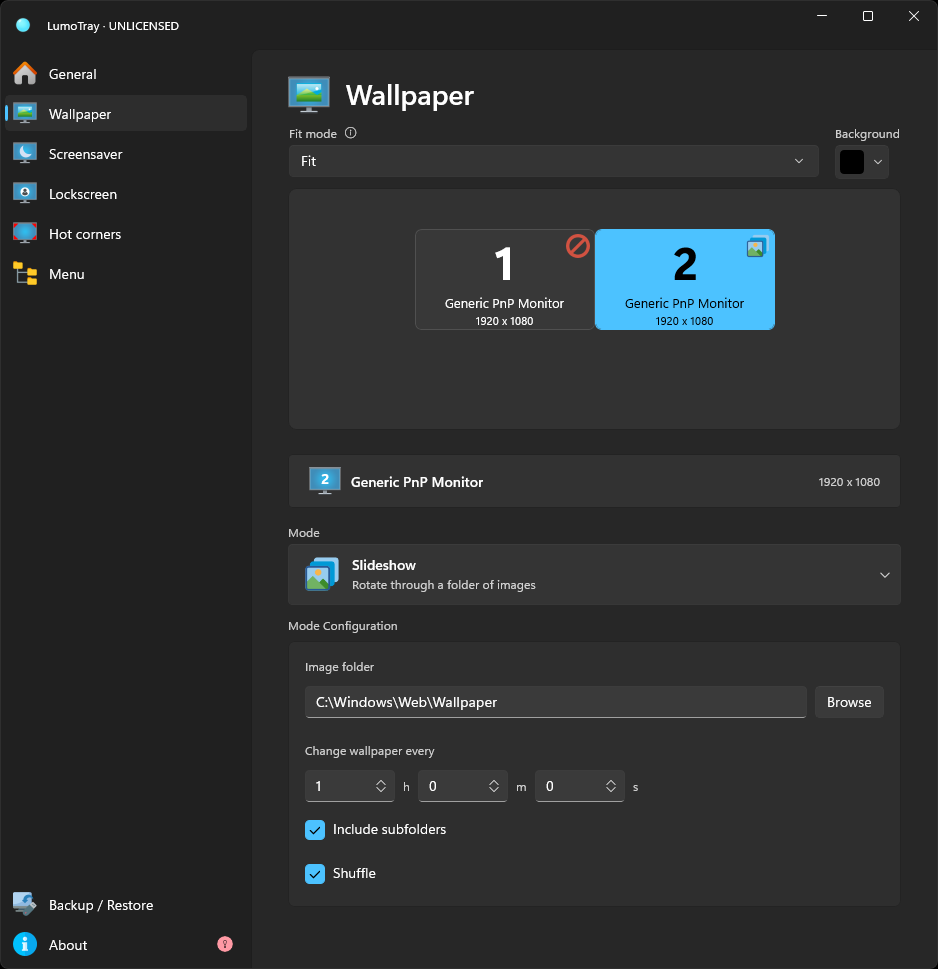
LumoTray's wallpaper manager does not use Windows' personalization settings at all. It applies wallpapers directly to each monitor, bypassing the Windows theme system and the virtual desktop configuration manager entirely.
This architectural difference matters for the virtual desktop bug. When Windows "forces the wallpaper" during a desktop switch, LumoTray is not participating in that back-and-forth. It manages wallpapers at the monitor level independently of whatever Windows thinks the current theme is. The virtual desktop configuration manager bug that caused wallpapers to vanish after reboots - that code path was never involved in the first place.
What this means in practice:
- Wallpapers stay put regardless of virtual desktop switching behavior.
- Slideshow folders, intervals, and shuffle settings are stored and managed by LumoTray, not by the Windows personalization backend.
- Per-monitor wallpaper configuration lives in LumoTray's own settings, so it persists across reboots and updates without depending on whichever Windows wallpaper bug is current.
- You can set independent wallpapers on each monitor - slideshows, daily sources like Bing or Unsplash, static images, live backgrounds - all managed outside the Windows theme pipeline.
If you want to stay with Windows-only
If you rely on Windows' built-in wallpaper manager and just want your settings to stick, install the July 2026 update. Go to Settings > Windows Update, check for updates, and confirm KB5101650 is installed. After that, per-desktop wallpaper assignments should survive reboots.
For the slideshow-to-picture switching bug during active virtual desktop use, the workaround is still to avoid using Windows' built-in slideshow mode when you regularly switch virtual desktops. Set a static image, or use something that manages wallpapers outside the Windows theme system.
The broader point
This bug is not a one-off. Windows' personalization infrastructure has accumulated layers of complexity over multiple releases, and virtual desktops in particular were retrofitted onto a system originally designed for a single workspace. When Microsoft describes a bug as "a missing persistence call in the Virtual Desktop configuration manager," what they are really describing is a feature - per-desktop wallpaper persistence - that was bolted on but never fully wired up.
If you use virtual desktops heavily and care about your desktop wallpaper, the safest long-term approach is to keep wallpaper management separate from Windows' built-in personalization layer. That way, the next time a cumulative update breaks something in the virtual desktop wallpaper stack, you will not be the one filing the Q&A thread.
Get LumoTray from the Microsoft StoreAlso read: how to set different wallpapers on multiple monitors, per-monitor wallpaper slideshows, and Windows Spotlight alternatives for daily wallpapers.